
Retrieval Workflow#
The retrieval workflow starts from a TOML project and ends with normalized data
records available to the rest of the run. The same pattern works for
[workflow].mode = "overview" and for solver workflows that need data-backed
geometry, forcing, observations, or boundary conditions.
Minimal public-data stack#
This example uses public providers for a French basin. It is intentionally small enough to read in one pass:
[data]
project_crs = "EPSG:2154"
inference_mode = "strict"
types = ["dem", "geology", "hydrography", "hydrometry", "piezometry", "recharge"]

[[data.dem.sources]]
source = "ign_geoplateforme_dem"
dataset = "bd-alti"
resolution_m = 25.0
extent = "watershed"

[[data.geology.sources]]
source = "brgm_1m"
extent = "watershed"

[[data.hydrography.sources]]
source = "bdtopage"

[data.hydrometry]
date_start = "2018-01-01"
date_end = "2020-12-31"

[[data.hydrometry.sources]]
source = "hubeau"
product = "QmnJ"
extent = "watershed"
require_observations = true
fallback_search_radius_km = 10

[data.piezometry]
date_start = "2018-01-01"
date_end = "2020-12-31"

[[data.piezometry.sources]]
source = "hubeau"
extent = "watershed"
product = "level"

[data.recharge]
date_start = "2018-01-01"
date_end = "2020-12-31"

[[data.recharge.sources]]
source = "sim2"
extent = "watershed"
Read it from top to bottom:
typesis the explicit family list.project_crsis the target CRS for normalized project data.extent = "watershed"asks compatible providers to use the project watershed or study-area extent.Date windows live on the family section, such as
[data.hydrometry].hydrographyproviders do not expose anextentfield in their source config; the runtime uses the geographic context passed to the hydrography manager.
What the stack produces#
On the Nancon reference basin, the same kind of declaration produces visible data diagnostics before any solver is executed.


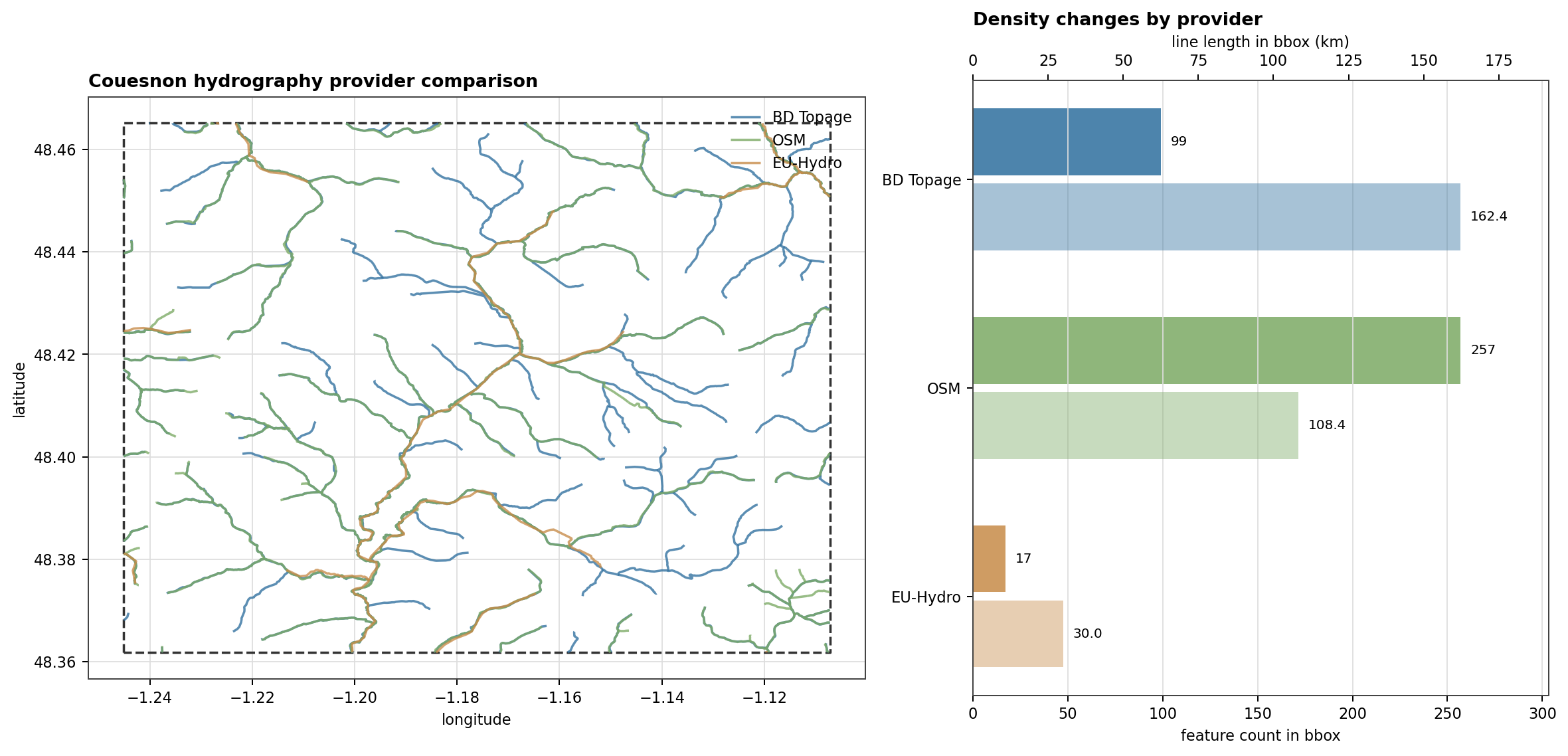
Fig. 113 The provider choice itself can change the loaded network. The Couesnon replay compares BD Topage, OSM, and EU-Hydro after clipping them to the same bbox, which is the kind of check to do before selecting a hydrography source.#

Active families and inference#
data.types is the user’s explicit contract. The planner can also infer
families from other model sections:
Runtime clue |
Inferred family |
Why |
|---|---|---|
|
|
The domain asks for geology-backed zones. |
|
|
Stream boundary conditions need a river network. |
|
|
Coastal boundary conditions need sea-level data. |
Use inference_mode = "warn" while exploring. Use
inference_mode = "strict" when the TOML should fail if an inferred family
does not have an explicit section. geology is the exception: it can be
defaulted when inferred.
Spatial filters#
Most API-backed spatial sources need one of these selectors:
Selector |
Typical families |
Use it when |
|---|---|---|
|
DEM, geology, Hub’Eau families, SIM2 forcing |
The project has a resolved watershed and you want the basin window. |
|
DEM, geology, Hub’Eau families, SIM2 forcing |
You want the larger project context when available. |
|
DEM, geology, point/time-series families, gridded forcing |
A local polygon or raster mask is the authoritative spatial filter. |
|
Hydrometry, piezometry, water quality, climate-style point sources |
The stations are known and should not be discovered by bbox. |
|
Intermittency |
ONDE discovery should use French department codes. |
Temporal filters#
Time windows are set on the family block:
[data.hydrometry]
date_start = "2020-01-01"
date_end = "2020-12-31"

[[data.hydrometry.sources]]
source = "hubeau"
extent = "watershed"
The family-level window is reused by all sources in that family. SIM2 sources also require a project period, so explicit dates are the clearest option for reproducible forcing downloads.
Running and inspecting#
Use an overview workflow when you want to audit data without a solver:
hmp run examples/projects/05_nancon_data_overview/config_overview.toml
After a run, inspect the workspace data catalog:
hmp data list --workspace ~/hydromodpy
hmp data list --workspace ~/hydromodpy --variable hydrometry
hmp data check --workspace ~/hydromodpy
Use force_refresh = true only on the source that should bypass the cache:
[[data.recharge.sources]]
source = "sim2"
extent = "watershed"
force_refresh = true
Use hmp run --frozen when the run must not download or ingest anything that
is not already present and locked.
Observation panels#
Once the data is loaded, the overview workflow can also render the observation chronicles that later serve comparison or calibration work.


Failure triage#
If a provider says a bbox is missing, add
extentormask_pathon a source that supports it.If a time-series provider returns no stations, try explicit
station_idsor a smallfallback_search_radius_km.If a custom vector geology file fails, check that
code_fieldnames an existing attribute column.If a gridded custom forcing has wrong magnitudes, set
source_unitinstead of editing solver parameters to compensate.