
Workspace Layout#
HydroModPy V1 organises every project around three nested levels:
workspace > project > run. The workspace is the root directory
that mutualises an input data/ folder; each project holds its
own catalog.duckdb plus the simulations/ artefacts; each
run is one row in that project catalog plus its Zarr and Parquet
stores.
The most useful mental model is:
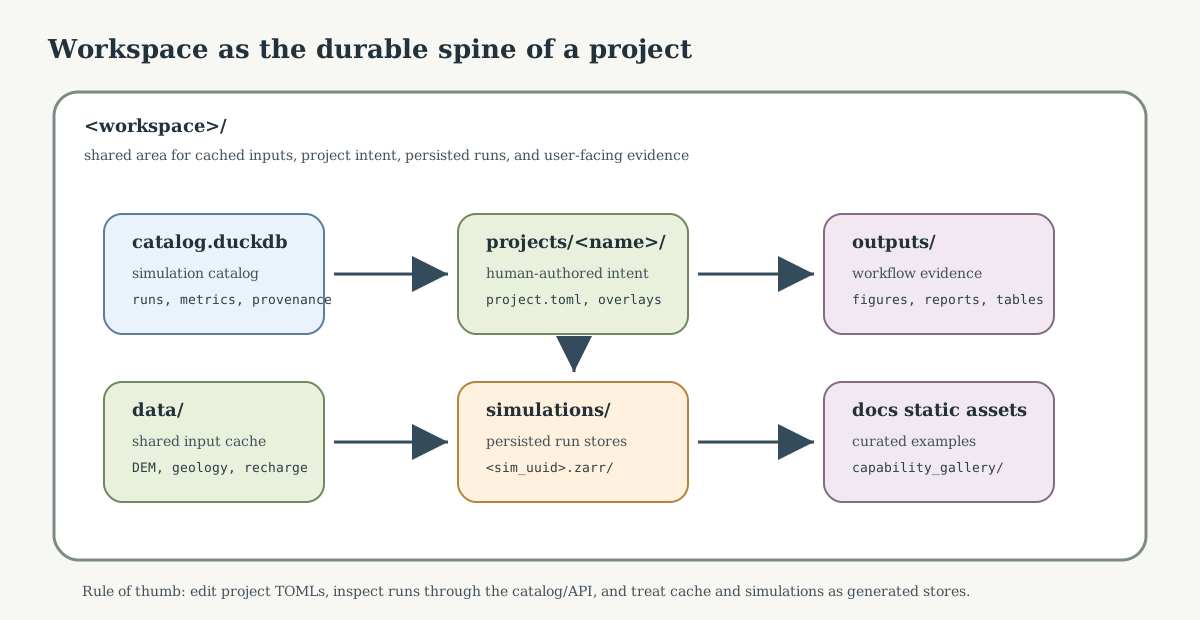
Fig. 15 The workspace separates human-authored intent, reusable input data, persisted run stores, and user-facing evidence. That separation is what keeps repeated workflows inspectable instead of turning one project folder into an unstructured output dump.#
workspace = shared working area
project   = one modelling setup inside that area
run       = one persisted execution of a workflow
cache     = reusable input data, not a result
catalog   = index of what has been run (one per project)
Why three levels#
HydroModPy workflows produce more than one output file. A run can involve DEM processing, hydrography loading, mesh generation, solver inputs, solver outputs, figures, and catalog metadata. Splitting storage into workspace > project > run gives one stable place for each concern:
input-data cache shared by several projects on the same geographic area;
project TOMLs (
hydromodpy.toml) and overlays;per-project simulation catalog rows (
catalog.duckdb);per-run artefacts (Zarr field store, Parquet tables);
figures and reports generated by workflows;
intermediate artifacts that should remain inspectable.
Canonical layout#
<workspace>/
├── workspace.toml                metadata of the research workspace
├── data/
│   ├── cache.duckdb              input data cache (one per workspace)
│   └── <variable>/
│       ├── raw/                  immutable downloads + .json sidecars
│       └── processed/            reprojected and clipped derivatives
└── projects/
    ├── my_basin/
    │   ├── hydromodpy.toml       project config (Pydantic root)
    │   ├── catalog.duckdb        simulation catalog
    │   └── simulations/
    │       ├── <basename>.zarr/ or .zarr.zip
    │       └── <basename>.parquet/
    └── another_project/
        ├── hydromodpy.toml
        └── catalog.duckdb
The simulations filenames use a human-readable basename built from
project, name, and the first characters of sim_id. The
database identity remains the full sim_id stored in the project
catalog.duckdb.
Scaffold a workspace and project with the CLI:
hmp workspace init ~/hmp_workspace
hmp project new my_basin --workspace ~/hmp_workspace
Resolution rules#
Given a project hydromodpy.toml, HydroModPy resolves the
surrounding workspace by:
Explicit workspace section in the TOML:
[workspace]
root = "/path/to/workspace"
# or per-component overrides:
# catalog_path = "/path/to/projects/my_basin/catalog.duckdb"
# data_dir = "/path/to/data"
# simulations_dir = "/path/to/projects/my_basin/simulations"
Scaffold discovery: the TOML lives at
<workspace>/projects/<name>/hydromodpy.tomland<workspace>contains adata/directory (cache scope) and the project holds acatalog.duckdb.Environment override for unit tests and notebooks:
HMP_STATE_HOME,HMP_CACHE_HOME,HMP_BINroute the machine-wide caches; the resolver itself does not walk up arbitrarily.
Anything else raises WorkspaceError with an actionable hint. There
is no silent fallback to project_root.
Diagnose resolution#
hmp doctor reports which branch produced the workspace and lists
the resolved paths:
hmp doctor --toml ~/hmp_workspace/projects/my_basin/hydromodpy.toml
Sample output:
OK     workspace            resolved via scaffold
OK     workspace_root       /home/bb/hmp_workspace
OK     project_catalog      /home/bb/hmp_workspace/projects/my_basin/catalog.duckdb
OK     data_dir             /home/bb/hmp_workspace/data
OK     simulations_dir      /home/bb/hmp_workspace/projects/my_basin/simulations
When the TOML cannot be resolved, hmp doctor surfaces the exact
WorkspaceError message that hmp run would raise.
Machine global index#
Cross-workspace discovery is handled by a machine-wide
index.duckdb under $XDG_STATE_HOME/hydromodpy/. It is fully
recreatable from registered workspaces; use hmp index search,
hmp index forget, and hmp index prune to operate it.